
Call us FREE on 0800 488 000
X
X

Please Log In Below

Forgotten Password?
Retry
Sorry! You can't edit your cart on this page.
Sorry! This item could not be added to your cart as it is no longer available from Comms Express.
Please check the quantity you are adding and try again.
The following item has been added to your cart.
Product Code:
Options:
Qty:
Unit Price:£
View Cart
Checkout
Your cart is empty!
Subtotal:
£0
Remove all items from cart
Are you sure? Yes No
Learn more about how
to collect Data Points
for free gifts.
Request A Quote
View Cart
Checkout
Cookie Policy×

Hi there! Our website may store cookies on your computer in order to give you the best experience, such as remembering the items in your cart so you can continue shopping where you left off.

By continuing to use our site, you give consent for cookies to be used.

Spend £50.00 for
FREE DELIVERY.
Free delivery excludes heavy and bulky products
Browse Categories
In Stock: 2-3 Weeks
£13.17
£15.80 Inc VAT
Earn 6 Data Points when purchasing this product. More Info

Extreme Networks ACC-BKT-TB-NF Mounting Bracket for Network Device

by Extreme Networks
See more product details
Part No:ENACC-BKT-TB-NF
Manufacturer No:ACC-BKT-TB-NF
Delivery: In Stock: 2-3 Weeks
Feefo logo

/assets/images/gallery/large/1742211971Extreme_Prod_Logo.jpg

Extreme Networks ACC-BKT-TB-NF Mounting Bracket for Network Device
More Related Items
Click to change options
Colour:
Apply
£1.26 Ex VAT
Qty:
Click to change options
Colour:
Apply
£140.17 Ex VAT
Qty:
Email product to a friend
X
  • Scroll to top

    About this task

    The AP305C/CX access point can be mounted on a 15/16 in. wide ceiling rail using the ACC-BKT-TB-NF adapter, when the ceiling tile protrudes below the T-bar. The AP305C/CX access point comes with in-built clips in the back of the access point that attach directly on to the -NF adapter, eliminating the need for the -TB accessory.

    Procedure

    1. Remove the ceiling tiles.
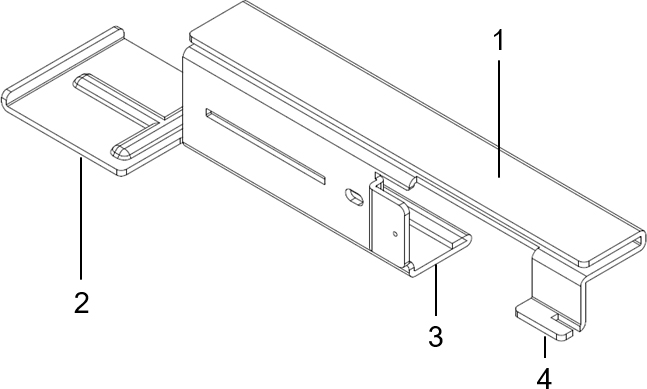
    2. Using the adapter guide on the top half of the ACC-BKT-TB-NF adapter, align and attach the -NF on to the ceiling rail.
      Callout Description
      1 Adapter guide for ceiling rail attachment
      2 Adapter end
      3 Indent for - NF second part attachment
      4 Adapter tabs
    3. Slide the other part of the -NF adapter onto the half attached to the ceiling rail.

      *When the adapter parts are attached properly, the adapter ends will line up after the two halves have snapped together.


    4. Align the built-in clips on the AP305C/CX access point against the -NF adapter end.
    5. Rotate the access point clockwise and attach it to the -NF adapter until it clicks into place.
    6. Plug the RJ45 connector plug into ETH or ETH0, RJ45 connector receptacle on the access point.
    7. Attach the Ethernet port cap to the access point Ethernet port.
    8. Place the cable cover over the Ethernet cable.
    9. Replace the ceiling tiles.

    About this task

    The AP305C/CX access point can be mounted on a 15/16 in. wide ceiling rail using the ACC-BKT-TB-NF adapter, when the ceiling tile protrudes below the T-bar. The AP305C/CX access point comes with in-built clips in the back of the access point that attach directly on to the -NF adapter, eliminating the need for the -TB accessory.


    Procedure

    1. Remove the ceiling tiles.
    2. Using the adapter guide on the top half of the ACC-BKT-TB-NF adapter, align and attach the -NF on to the ceiling rail.
      Callout Description
      1 Adapter guide for ceiling rail attachment
      2 Adapter end
      3 Indent for - NF second part attachment
      4 Adapter tabs
    3. Slide the other part of the -NF adapter onto the half attached to the ceiling rail.

      *When the adapter parts are attached properly, the adapter ends will line up after the two halves have snapped together.

    4. Align the built-in clips on the AP305C/CX access point against the -NF adapter end.
    5. Rotate the access point clockwise and attach it to the -NF adapter until it clicks into place.
    6. Plug the RJ45 connector plug into ETH or ETH0, RJ45 connector receptacle on the access point.
    7. Attach the Ethernet port cap to the access point Ethernet port.
    8. Place the cable cover over the Ethernet cable.
    9. Replace the ceiling tiles.

    Product data is provided by Icecat, we do not warrant the accuracy of the material above.

    Email product to a friend
    Print product details
    View Keywording:
    Recently Viewed Items