
Call us FREE on 0800 488 000
X
X

Please Log In Below

Forgotten Password?
Retry
Sorry! You can't edit your cart on this page.
Sorry! This item could not be added to your cart as it is no longer available from Comms Express.
Please check the quantity you are adding and try again.
The following item has been added to your cart.
Product Code:
Options:
Qty:
Unit Price:£
View Cart
Checkout
Your cart is empty!
Subtotal:
£0
Remove all items from cart
Are you sure? Yes No
Learn more about how
to collect Data Points
for free gifts.
Request A Quote
View Cart
Checkout
Cookie Policy×

Hi there! Our website may store cookies on your computer in order to give you the best experience, such as remembering the items in your cart so you can continue shopping where you left off.

By continuing to use our site, you give consent for cookies to be used.

Spend £50.00 for
FREE DELIVERY.
Free delivery excludes heavy and bulky products
Browse Categories
In Stock: 7-10 Days
£23.05
£27.66 Inc VAT
Earn 11 Data Points when purchasing this product. More Info

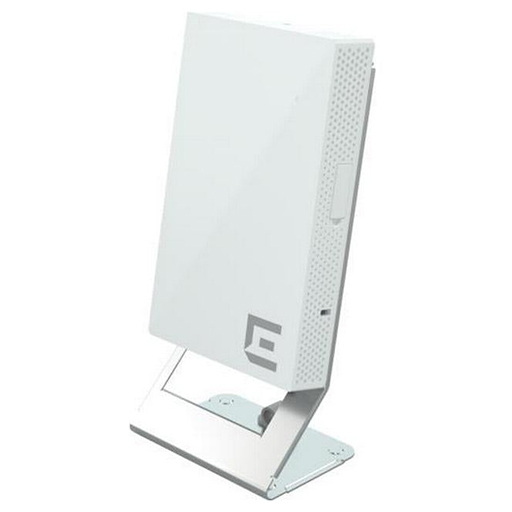
Extreme Networks ACC-BKT-AX-TBW Mounting Bracket for Mounting Bar & Wireless Access Point

by Extreme Networks
See more product details
Part No:ENACC-BKT-AX-TBW
Manufacturer No:ACC-BKT-AX-TBW
Delivery: In Stock: 7-10 Days
Feefo logo

/assets/images/gallery/large/1742203796Extreme_Prod_Logo.jpg

Extreme Networks ACC-BKT-AX-TBW Mounting Bracket for Mounting Bar & Wireless Access Point
More Related Items
Click to change options
Colour:
Apply
£387.50 Ex VAT
Qty:
Click to change options
Colour:
Door:
Flat Pack:
Accessory Kit:
Apply
£668.75 Ex VAT
Qty:
Email product to a friend
X
  • Scroll to top

    The following hardware is required for installing the ACC-BKT-AX-TBW accessory on a T-bar:

    • An indoor access point
    • One ACC-BKT-AX-TBW Accessory
    • Two M3.5 screws (included in the -TBW accessory)


    About this Task

    You can use the ACC-BKT-AX-TBW accessory for T-bar installation. The -TBW bracket is used for 1.5 inch wide T-bars with varying thickness from 3.175 mm to 6.350 mm, with flush ceiling tiles. The following ceiling tile protrusions are accommodated by the -TBW mounting bracket:
    • If the T-bar is 0.25 inches thick, the -TBW bracket will only accommodate flush ceiling tiles
    • If the T-bar is 0.1875 inches thick, the -TBW bracket will accommodate flush ceiling tiles as well as ceiling tiles with 0.062 inches protrusion
    • If the T-bar is 0.125 inches thick, the -TBW bracket will accommodate flush ceiling tiles as well as ceiling tiles up to 0.125 inches protrusion
    DGS-1210-52MP
    Callout Description
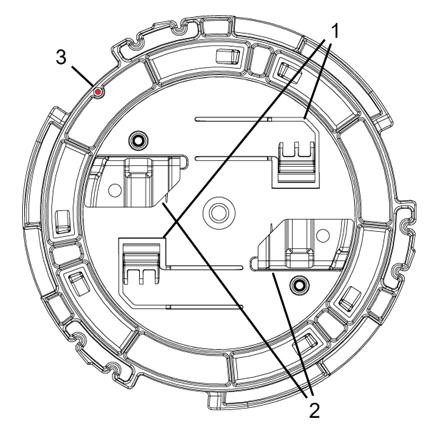
    1 -TBW bracket plastic parts
    2 -TBW bracket metal parts
    3 Red on the bracket to align against the access point


    Procedure

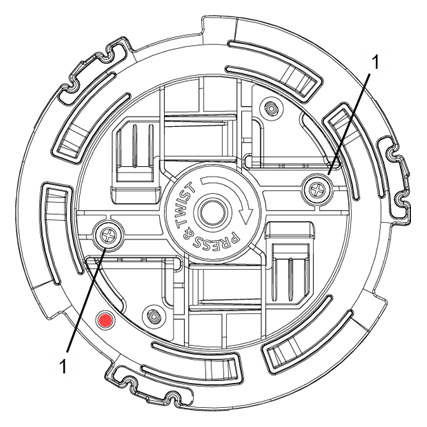
    1. Turn the -TBW accessory screws in such a way that they do not extend past the plastic on the T-bar side.
    2. Align the -TBW accessory metal clips on a T-bar and rotate the metal clip about 1/6th turn clockwise to attach the bracket to the T-bar.
    3. Tighten the screws until either resistance is noticed or the screw head bottoms on the -TBW accessory plastic part.
      DGS-1210-52MP
      Callout Description
      1 Screws for tightening to T-bar
    4. Attach the access point to the -TBW bracket by aligning the red dot on the bracket and the access point.
    5. Press and rotate the access point 1/6th turn clockwise until it clicks into place on the bracket.
    6. Attach the Cat5e RJ45 cable to the ETH0 port on AP305C/CX or the Cat6 RJ45 cable to the ETH0 or ETH1 port on all other indoor access points.
    7. If desired for aesthetics, place the cable cover over the Ethernet cable.

    The following hardware is required for installing the ACC-BKT-AX-TBW accessory on a T-bar:

    • An indoor access point
    • One ACC-BKT-AX-TBW Accessory
    • Two M3.5 screws (included in the -TBW accessory)


    About this Task

    You can use the ACC-BKT-AX-TBW accessory for T-bar installation. The -TBW bracket is used for 1.5 inch wide T-bars with varying thickness from 3.175 mm to 6.350 mm, with flush ceiling tiles. The following ceiling tile protrusions are accommodated by the -TBW mounting bracket:

    • If the T-bar is 0.25 inches thick, the -TBW bracket will only accommodate flush ceiling tiles
    • If the T-bar is 0.1875 inches thick, the -TBW bracket will accommodate flush ceiling tiles as well as ceiling tiles with 0.062 inches protrusion
    • If the T-bar is 0.125 inches thick, the -TBW bracket will accommodate flush ceiling tiles as well as ceiling tiles up to 0.125 inches protrusion
    DGS-1210-52MP
    Callout Description
    1 -TBW bracket plastic parts
    2 -TBW bracket metal parts
    3 Red on the bracket to align against the access point


    Procedure

    1. Turn the -TBW accessory screws in such a way that they do not extend past the plastic on the T-bar side.
    2. Align the -TBW accessory metal clips on a T-bar and rotate the metal clip about 1/6th turn clockwise to attach the bracket to the T-bar.
    3. Tighten the screws until either resistance is noticed or the screw head bottoms on the -TBW accessory plastic part.
      DGS-1210-52MP
      Callout Description
      1 Screws for tightening to T-bar
    4. Attach the access point to the -TBW bracket by aligning the red dot on the bracket and the access point.
    5. Press and rotate the access point 1/6th turn clockwise until it clicks into place on the bracket.
    6. Attach the Cat5e RJ45 cable to the ETH0 port on AP305C/CX or the Cat6 RJ45 cable to the ETH0 or ETH1 port on all other indoor access points.
    7. If desired for aesthetics, place the cable cover over the Ethernet cable.

    Product data is provided by Icecat, we do not warrant the accuracy of the material above.

    Email product to a friend
    Print product details
    View Keywording: