


| Product Code: | |
| Options: | |
| Qty: | |
| Unit Price: | £ |

| Part No: | FEUS1GC301AU |
| Manufacturer No: | US1GC301AU |
| Delivery: | In Stock: Next Day |


 |
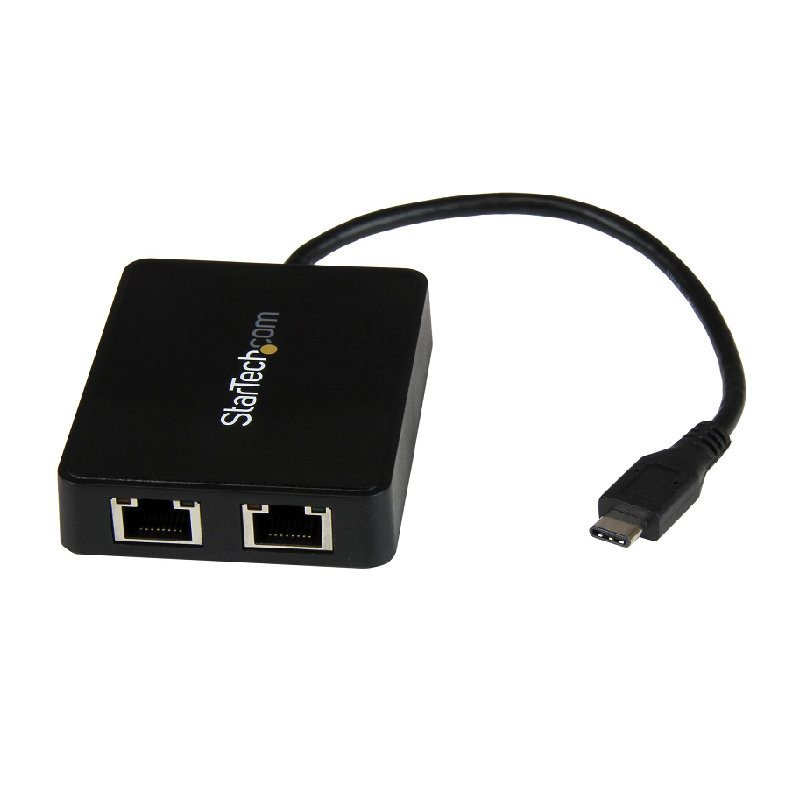
USB-C to Gigabit Network Adapter with Extra USB 3.0 Port - Black
Use the USB Type-C port on your laptop to add a Gigabit Ethernet port and a USB 3.1 Gen 1 (type-A) port

Now, you can easily connect to a Gigabit network through the USB-C™ or Thunderbolt™ 3 port on your laptop or desktop computer, and add connectivity for an additional USB (Type-A) peripheral device. It's a great companion for your MacBook, Chromebook Pixel™, Dell™ XPS 12, Dell Latitude 12 7000 Series 2-in-1 or other devices.
The USB-C network adapter supports full Gigabit bandwidth by harnessing the performance of USB 3.1 Gen 1 (5 Gbps). You can quickly access very large files over the network at Gigabit speed.
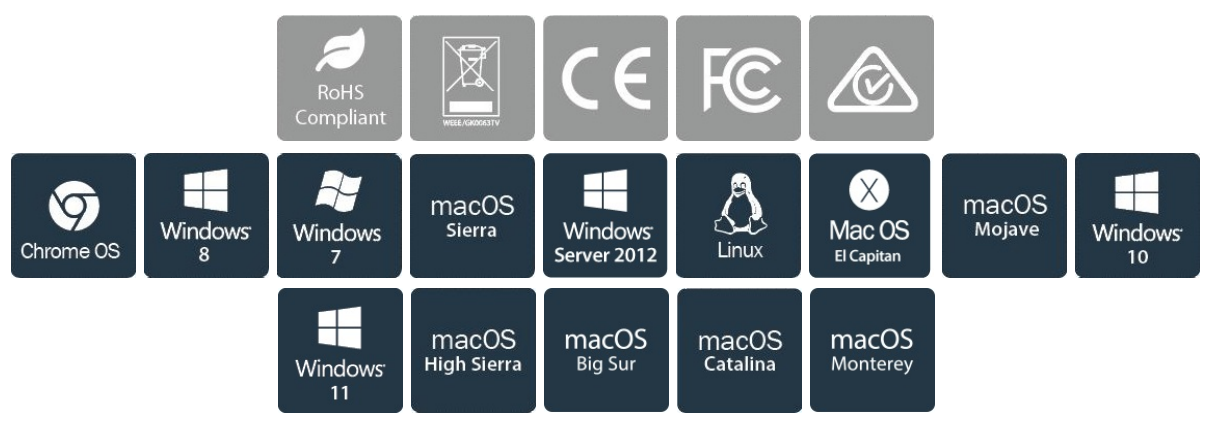
Get up and running quickly. Simply plug the adapter into the USB Type-C™ port on your laptop and connect to your network. The network adapter chipset provides native driver support in Chrome OS™ and Windows® 8.1, and supports Mac OSX (10.10) with driver installation.
The USB-C connector is smaller and easier to use than previous USB connectors. It’s a reversible plug so you can connect to your devices with either side facing up, without frustration or the risk of port damage.
With a compact design, this USB-C network adapter is as portable as your laptop, perfect for ultra-portable devices that have a USB-C port, such as the MacBook and Chromebook Pixel™. The network adapter is bus-powered which makes it easy to connect when you’re on the go.
Some computers with USB Type-C only offer one port for external connectivity. This Ethernet adapter features a built-in USB Type-A port, giving you the freedom to attach an additional peripheral device, such as a USB mouse.
Developed to improve performance and security, StarTech.com Connectivity Tools is the only software suite on the market that works with a wide range of IT connectivity accessories. The software suite includes:
Mac Address Pass-Through Utility: To improve network security.
Wi-Fi Auto Switch Utility: Enabling users to quickly access faster network speeds via wired LAN.
For more information and to download the StarTech.com Connectivity Tools application, please visit: www.StarTech.com/Connectivity-Tools
The US1GC301AU is backed by a StarTech.com 2-year warranty and free lifetime technical support.
| Ports & interfaces | |
| Internal | No |
| USB version | 3.2 Gen 2 (3.1 Gen 2) |
| USB 3.2 Gen 1 (3.1 Gen 1) Type-A hub ports quantity | 1 |
| USB pass-through | Yes |
| Ethernet LAN (RJ-45) ports | 1 |
| Interface | Ethernet |
| Host interface | USB |
| Connectivity technology | Wired |
| Bandwidth | |
| Full duplex | Yes |
| Maximum data transfer rate | 5000 Mbit/s |
| Network | |
| Chipset | ASIX - AX88179, VIA/VLI - VL812 |
| VLAN tagging | Yes |
| Jumbo frames | 4000 |
| Ethernet LAN | Yes |
| Cabling technology | 10/100/1000BaseT(X) |
| Networking standards | IEEE 802.1Q,IEEE 802.3,IEEE 802.3ab,IEEE 802.3az,IEEE 802.3u |
| Wake-on-LAN ready | Yes |
| Auto MDIX IEEE | Yes |
| Jumbo frames support | Yes |
| Full duplex | Yes |
| Ethernet LAN data rates | 10, 100, 1000 Mbit/s |
| Maximum data transfer rate | 5000 Mbit/s |
| Technical details | |
| Product colour | Black |
| Wake-on-LAN ready | Yes |
| Auto MDIX IEEE | Yes |
| Sustainability certificates | RoHS |
| Design | |
| Product colour | Black |
| Chipset | ASIX - AX88179, VIA/VLI - VL812 |
| Certification | CE, FCC |
| Housing material | Plastic |
| Internal | No |
| LED indicators | Activity, Link |
| Operational conditions | |
| Operating temperature (T-T) | 0 - 50 °C |
| Storage temperature (T-T) | -10 - 60 °C |
| Operating relative humidity (H-H) | 5 - 80 °C |
| Weight & dimensions | |
| Width | 35 mm |
| Depth | 170 mm |
| Height | 30 mm |
| Weight | 38 g |
| Packaging data | |
| Package width | 143 mm |
| Package depth | 170 mm |
| Package height | 17 mm |
| Package weight | 92 g |
Full specification and details can be found in the PDF file
USB-C to Gigabit Network Adapter with Extra USB 3.0 Port - Black
Use the USB Type-C port on your laptop to add a Gigabit Ethernet port and a USB 3.1 Gen 1 (type-A) port
Now, you can easily connect to a Gigabit network through the USB-C™ or Thunderbolt™ 3 port on your laptop or desktop computer, and add connectivity for an additional USB (Type-A) peripheral device. It's a great companion for your MacBook, Chromebook Pixel™, Dell™ XPS 12, Dell Latitude 12 7000 Series 2-in-1 or other devices.
The USB-C network adapter supports full Gigabit bandwidth by harnessing the performance of USB 3.1 Gen 1 (5 Gbps). You can quickly access very large files over the network at Gigabit speed.
Get up and running quickly. Simply plug the adapter into the USB Type-C™ port on your laptop and connect to your network. The network adapter chipset provides native driver support in Chrome OS™ and Windows® 8.1, and supports Mac OSX (10.10) with driver installation.
The USB-C connector is smaller and easier to use than previous USB connectors. It’s a reversible plug so you can connect to your devices with either side facing up, without frustration or the risk of port damage.
With a compact design, this USB-C network adapter is as portable as your laptop, perfect for ultra-portable devices that have a USB-C port, such as the MacBook and Chromebook Pixel™. The network adapter is bus-powered which makes it easy to connect when you’re on the go.
Some computers with USB Type-C only offer one port for external connectivity. This Ethernet adapter features a built-in USB Type-A port, giving you the freedom to attach an additional peripheral device, such as a USB mouse.
Developed to improve performance and security, StarTech.com Connectivity Tools is the only software suite on the market that works with a wide range of IT connectivity accessories. The software suite includes:
Mac Address Pass-Through Utility: To improve network security.
Wi-Fi Auto Switch Utility: Enabling users to quickly access faster network speeds via wired LAN.
For more information and to download the StarTech.com Connectivity Tools application, please visit: www.StarTech.com/Connectivity-Tools
The US1GC301AU is backed by a StarTech.com 2-year warranty and free lifetime technical support.
| Ports & interfaces | |
| Internal | No |
| USB version | 3.2 Gen 2 (3.1 Gen 2) |
| USB 3.2 Gen 1 (3.1 Gen 1) Type-A hub ports quantity | 1 |
| USB pass-through | Yes |
| Ethernet LAN (RJ-45) ports | 1 |
| Interface | Ethernet |
| Host interface | USB |
| Connectivity technology | Wired |
| Bandwidth | |
| Full duplex | Yes |
| Maximum data transfer rate | 5000 Mbit/s |
| Network | |
| Chipset | ASIX - AX88179, VIA/VLI - VL812 |
| VLAN tagging | Yes |
| Jumbo frames | 4000 |
| Ethernet LAN | Yes |
| Cabling technology | 10/100/1000BaseT(X) |
| Networking standards | IEEE 802.1Q,IEEE 802.3,IEEE 802.3ab,IEEE 802.3az,IEEE 802.3u |
| Wake-on-LAN ready | Yes |
| Auto MDIX IEEE | Yes |
| Jumbo frames support | Yes |
| Full duplex | Yes |
| Ethernet LAN data rates | 10, 100, 1000 Mbit/s |
| Maximum data transfer rate | 5000 Mbit/s |
| Technical details | |
| Product colour | Black |
| Wake-on-LAN ready | Yes |
| Auto MDIX IEEE | Yes |
| Sustainability certificates | RoHS |
| Design | |
| Product colour | Black |
| Chipset | ASIX - AX88179, VIA/VLI - VL812 |
| Certification | CE, FCC |
| Housing material | Plastic |
| Internal | No |
| LED indicators | Activity, Link |
| Operational conditions | |
| Operating temperature (T-T) | 0 - 50 °C |
| Storage temperature (T-T) | -10 - 60 °C |
| Operating relative humidity (H-H) | 5 - 80 °C |
| Weight & dimensions | |
| Width | 35 mm |
| Depth | 170 mm |
| Height | 30 mm |
| Weight | 38 g |
| Packaging data | |
| Package width | 143 mm |
| Package depth | 170 mm |
| Package height | 17 mm |
| Package weight | 92 g |
Full specification and details can be found in the PDF file
Product data is provided by Icecat, we do not warrant the accuracy of the material above.