


| Product Code: | |
| Options: | |
| Qty: | |
| Unit Price: | £ |

If you wish to enquire about this product please contact us on
0800 488 0000
Capacity: |
| Part No: | FESM-X916BZAEEUB |
| Manufacturer No: | SM-X916BZAEEUB |
| Delivery: | End of Life Product |

 |
The big display of the Galaxy Tab S9 Series makes it easy to use AI-assisted functions. Whether you're typing up a storm or jotting something down, Note Assist cuts the story short.
Simply begin writing and then format it into a clear, easy-to-read summary later. When you're looking for an old note, the new covers provide brief summaries, keeping your screen appearing structured.
Something out of place? Just move it in post. Using AI-assisted features just got easier with Galaxy Tab S9 Series' large display. New AI-powered editing options let you get the photo you wanted, like relocating objects and intelligently filling in the space they left behind.
Experience Circle to Search with Google and search like never before. Simply circle around an object to get Google Search results. It’s a new visual way to find what you're looking for. Search like never before with Circle to Search thanks to Google.
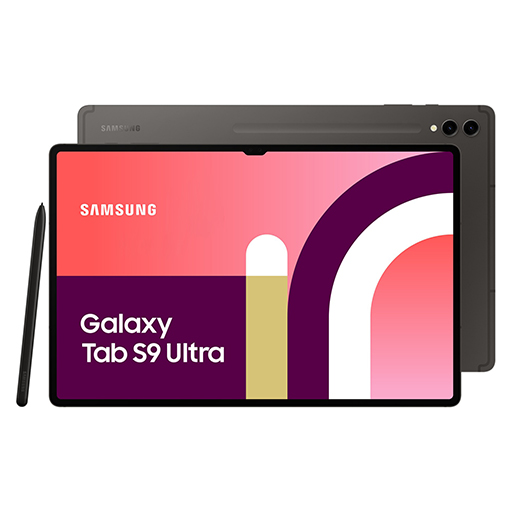
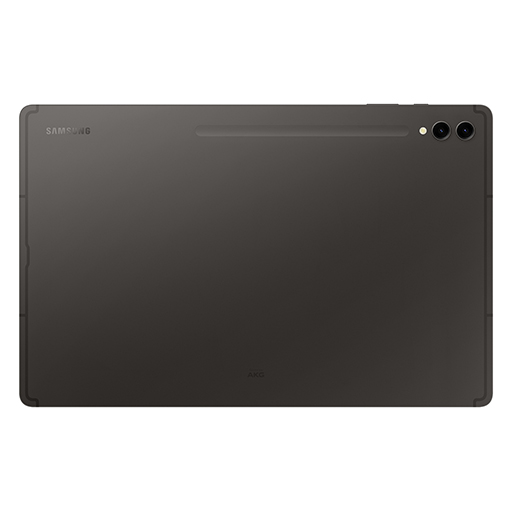
Choose between understated, professional Graphite and soft, natural Beige — both accentuated with premium detailing and a smooth blasting finish for a sophisticated look.
Whether you choose Galaxy Tab S9, Galaxy Tab S9+ or Galaxy Tab S9 Ultra, each is ready to bring your creative vision to life. All three feature a Dynamic AMOLED 2X display, delivering stunning color and visuals. Plus, it's easy on the eyes with reduced blue light emission
It's always the smallest things that matter most. Like the floating camera design on the back — crafted to elegantly encapsulate the upgraded camera system. We even reimagined the side buttons and speaker arrangement to feel more familiar.
Everything on screen is lifelike with the high-resolution Dynamic AMOLED 2X display. Details are crisp and clear with a wide range of vivid colors and true blacks thanks to HDR10+ enhanced visuals and smooth scrolling at up to 120Hz refresh rate.
The Galaxy Tab S9 Series delivers an engrossing, photo-realistic gaming experience on the Tab's expansive screen for marathon playthroughs.The experience is heightened with immersive audio from the quad AKG speaker system and Dolby Atmos surround sound.
When the day gets tough, the Galaxy Tab S9 Series stays sturdy and durable. The smooth metal design is suited up with our strongest Armor Aluminum frame — living up to its name by protecting your tablet from shocks and drops. And the IP68 rating means it's our first water and dust-resistant Galaxy Tab S Series ever.
We rebuilt the included S Pen to be IP68 water resistant just like the tablet. It's also improved across the board, with enhanced tip sensitivity for less accidental clicks. And with the magnetic attachment and bidirectional charging, just snap it on to charge.
Vision Booster lets you see your screen clearly in brightly lit areas thanks to an intelligent outdoor algorithm that detects the sun's glow and shifts to match. Go between the studio and patio with ease thanks to contrast and color enhancements to keep things vibrant.
The extremely fast Snapdragon® 8 Gen 2 for Galaxy processor is intelligently engineered to deliver revved-up performance and power savings for champion-level gameplay. The graphics engine powers true-to-life reflections and shadows in 3D gaming environments for immersive gaming.
Keep the creative juices flowing with the long-lasting battery. It's got enough power to get you through your day and even spare some in case your phone needs a boost, too. Plug in your Samsung Galaxy smartphone with a USB-C cable and Fast Charging takes care of the rest.
Choose up to 1TB internal storage, sketch your masterpiece with GoodNotes, then grab your microSD to add on more storage in case you need even more room for your videos, compositions, hi-res photos and more.
Let your imagination run wild on pro-level notetaking with GoodNotes — optimized to provide a seamless S Pen experience and feel of writing on actual paper. Sketch in portrait view and edit in horizontal view, or vice versa.
With the NotePaper Screen, writing is the next best thing to pen and paper. Add in S Pen — the ultimate drawing tool to elevate your canvas. It is sensitive to pressure and tilt, allowing you to create detailed sketches and illustrations with precision and control.
Amp up your productivity with S Pen's enhanced note-taking functions. Quickly jot down novel ideas or make a quick diagram to get your point across. And with S Pen to Text, you can seamlessly turn your handwriting into text input in a wide range of apps like Google, Messages, Maps and more.
Pull your teammates in for a brainstorming session, facilitated by S Pen and Samsung Notes. Share notes between Samsung Galaxy devices to edit content in real time directly in the app. You can even scan multi-page documents easily and save them in Gallery to pull them up during video calls.
Attach the Book Cover Keyboard to topple your to-do lists with ease. Fully backlit with function keys and a trackpad, it supports DeX mode for a seamless PC-like experience. Assign app shortcuts to up your efficiency and connect wirelessly to other Samsung Galaxy devices to type smoothly on any screen.
Move massive files from one Samsung Galaxy device to another in a flash with Quick Share. Open up LumaFusion to take advantage of the expansive screen to edit, cut and add final touches with precision.
Painting on your tablet just got easier with the newly-added Simple Mode on Clip Studio Paint. Elevate multitasking with your smartphone by using Multi Control that allows you to drag and drop images between the devices, or instantly transfer files from your smartphone and continue editing on your tablet.
Conquer multiple tasks at once. You can sketch out architectural plans and choose captivating visuals and video chat — all on one screen without ever closing a window.
The big display of the Galaxy Tab S9 Series makes it easy to use AI-assisted functions. Whether you're typing up a storm or jotting something down, Note Assist cuts the story short.
Simply begin writing and then format it into a clear, easy-to-read summary later. When you're looking for an old note, the new covers provide brief summaries, keeping your screen appearing structured.
Something out of place? Just move it in post. Using AI-assisted features just got easier with Galaxy Tab S9 Series' large display. New AI-powered editing options let you get the photo you wanted, like relocating objects and intelligently filling in the space they left behind.
Experience Circle to Search with Google and search like never before. Simply circle around an object to get Google Search results. It’s a new visual way to find what you're looking for. Search like never before with Circle to Search thanks to Google.
Choose between understated, professional Graphite and soft, natural Beige — both accentuated with premium detailing and a smooth blasting finish for a sophisticated look.
Whether you choose Galaxy Tab S9, Galaxy Tab S9+ or Galaxy Tab S9 Ultra, each is ready to bring your creative vision to life. All three feature a Dynamic AMOLED 2X display, delivering stunning color and visuals. Plus, it's easy on the eyes with reduced blue light emission
It's always the smallest things that matter most. Like the floating camera design on the back — crafted to elegantly encapsulate the upgraded camera system. We even reimagined the side buttons and speaker arrangement to feel more familiar.
Everything on screen is lifelike with the high-resolution Dynamic AMOLED 2X display. Details are crisp and clear with a wide range of vivid colors and true blacks thanks to HDR10+ enhanced visuals and smooth scrolling at up to 120Hz refresh rate.
The Galaxy Tab S9 Series delivers an engrossing, photo-realistic gaming experience on the Tab's expansive screen for marathon playthroughs.The experience is heightened with immersive audio from the quad AKG speaker system and Dolby Atmos surround sound.
When the day gets tough, the Galaxy Tab S9 Series stays sturdy and durable. The smooth metal design is suited up with our strongest Armor Aluminum frame — living up to its name by protecting your tablet from shocks and drops. And the IP68 rating means it's our first water and dust-resistant Galaxy Tab S Series ever.
We rebuilt the included S Pen to be IP68 water resistant just like the tablet. It's also improved across the board, with enhanced tip sensitivity for less accidental clicks. And with the magnetic attachment and bidirectional charging, just snap it on to charge.
Vision Booster lets you see your screen clearly in brightly lit areas thanks to an intelligent outdoor algorithm that detects the sun's glow and shifts to match. Go between the studio and patio with ease thanks to contrast and color enhancements to keep things vibrant.
The extremely fast Snapdragon® 8 Gen 2 for Galaxy processor is intelligently engineered to deliver revved-up performance and power savings for champion-level gameplay. The graphics engine powers true-to-life reflections and shadows in 3D gaming environments for immersive gaming.
Keep the creative juices flowing with the long-lasting battery. It's got enough power to get you through your day and even spare some in case your phone needs a boost, too. Plug in your Samsung Galaxy smartphone with a USB-C cable and Fast Charging takes care of the rest.
Choose up to 1TB internal storage, sketch your masterpiece with GoodNotes, then grab your microSD to add on more storage in case you need even more room for your videos, compositions, hi-res photos and more.
Let your imagination run wild on pro-level notetaking with GoodNotes — optimized to provide a seamless S Pen experience and feel of writing on actual paper. Sketch in portrait view and edit in horizontal view, or vice versa.
With the NotePaper Screen, writing is the next best thing to pen and paper. Add in S Pen — the ultimate drawing tool to elevate your canvas. It is sensitive to pressure and tilt, allowing you to create detailed sketches and illustrations with precision and control.
Amp up your productivity with S Pen's enhanced note-taking functions. Quickly jot down novel ideas or make a quick diagram to get your point across. And with S Pen to Text, you can seamlessly turn your handwriting into text input in a wide range of apps like Google, Messages, Maps and more.
Pull your teammates in for a brainstorming session, facilitated by S Pen and Samsung Notes. Share notes between Samsung Galaxy devices to edit content in real time directly in the app. You can even scan multi-page documents easily and save them in Gallery to pull them up during video calls.
Attach the Book Cover Keyboard to topple your to-do lists with ease. Fully backlit with function keys and a trackpad, it supports DeX mode for a seamless PC-like experience. Assign app shortcuts to up your efficiency and connect wirelessly to other Samsung Galaxy devices to type smoothly on any screen.
Move massive files from one Samsung Galaxy device to another in a flash with Quick Share. Open up LumaFusion to take advantage of the expansive screen to edit, cut and add final touches with precision.
Painting on your tablet just got easier with the newly-added Simple Mode on Clip Studio Paint. Elevate multitasking with your smartphone by using Multi Control that allows you to drag and drop images between the devices, or instantly transfer files from your smartphone and continue editing on your tablet.
Conquer multiple tasks at once. You can sketch out architectural plans and choose captivating visuals and video chat — all on one screen without ever closing a window.