


| Product Code: | |
| Options: | |
| Qty: | |
| Unit Price: | £ |

| Part No: | FEQDA-UMP4 |
| Manufacturer No: | QDA-UMP4 |
| Delivery: | In Stock: Next Day |


 |
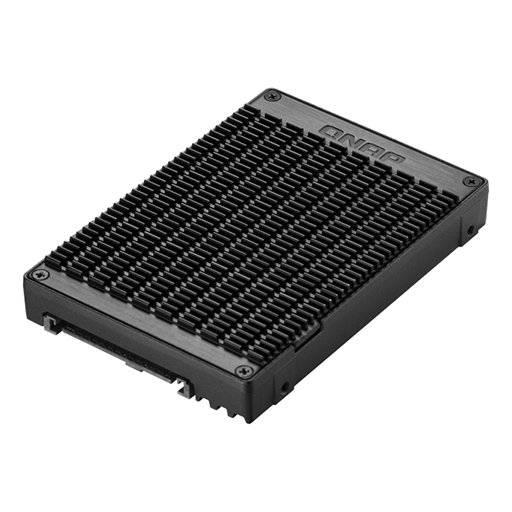
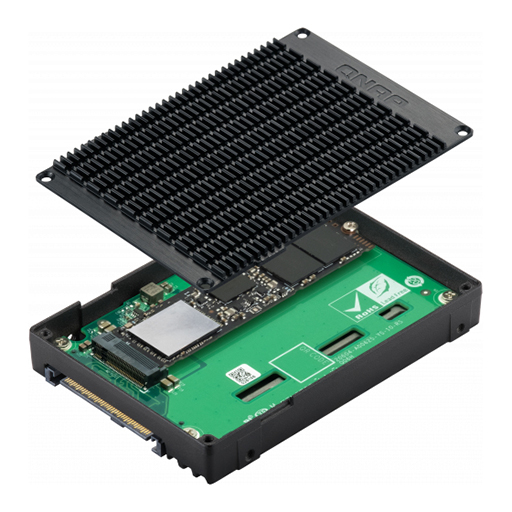
The QDA-UMP4 allows installing an M.2 PCIe 4.0 x4 NVMe SSD in a 2.5-inch U.2 (SFF-8639) PCIe 4.0 x4 NVMe SSD drive bay. No extra software or drivers are required for the QDA-UMP4 and it can be installed in a PC/workstation (Windows®, Linux®) or QNAP NAS to enable using M.2 SSDs as cost-effective alternatives to expensive U.2 SSDs.
Specifications
Features
High-quality construction for better heat dissipation/p>
The M.2 SSD thermal pads and aluminum-alloy metal frame assist in dissipating heat from the M.2 SSD to ensure high performance.
Install in a PC/workstation for higher performance or data protection
By using the QDA-UMP4 to install a M.2 SSD in the 2.5-inch U.2 SSD tray of a high-end PC/workstation (Windows® or Linux®), you can obtain a more budget-friendly way to supercharge bandwidth-demanding applications (such as on-the-fly video editing, server-grade applications, or online gaming). The status of the installed SSDs can be monitored using your preferred monitoring tool (such as manufacturer-provided utilities or third-party software like CrystalDiskInfo).
Install in QNAP NAS for efficient yet cost-effective storage
By allowing you to use M.2 SSDs instead of U.2 SSDs, the QDA-UMP4 enables you to optimize data-intensive applications in more cost-effective way. It can also boost IOPS performance when configuring SSD caching. Users can monitor drive health and manage SSD usage from the QTS Storage & Snapshots Manager.
Maintain high performance with cost savings
Using the QDA-UMP4 enables using M.2 NVMe SSDs as alternatives to U.2 NVMe SSDs, ensuring high-level performance at a more cost-effective price point.
Series Video
The QDA-UMP4 allows installing an M.2 PCIe 4.0 x4 NVMe SSD in a 2.5-inch U.2 (SFF-8639) PCIe 4.0 x4 NVMe SSD drive bay. No extra software or drivers are required for the QDA-UMP4 and it can be installed in a PC/workstation (Windows®, Linux®) or QNAP NAS to enable using M.2 SSDs as cost-effective alternatives to expensive U.2 SSDs.
Specifications
Features
High-quality construction for better heat dissipation/p>
The M.2 SSD thermal pads and aluminum-alloy metal frame assist in dissipating heat from the M.2 SSD to ensure high performance.
Install in a PC/workstation for higher performance or data protection
By using the QDA-UMP4 to install a M.2 SSD in the 2.5-inch U.2 SSD tray of a high-end PC/workstation (Windows® or Linux®), you can obtain a more budget-friendly way to supercharge bandwidth-demanding applications (such as on-the-fly video editing, server-grade applications, or online gaming). The status of the installed SSDs can be monitored using your preferred monitoring tool (such as manufacturer-provided utilities or third-party software like CrystalDiskInfo).
Install in QNAP NAS for efficient yet cost-effective storage
By allowing you to use M.2 SSDs instead of U.2 SSDs, the QDA-UMP4 enables you to optimize data-intensive applications in more cost-effective way. It can also boost IOPS performance when configuring SSD caching. Users can monitor drive health and manage SSD usage from the QTS Storage & Snapshots Manager.
Maintain high performance with cost savings
Using the QDA-UMP4 enables using M.2 NVMe SSDs as alternatives to U.2 NVMe SSDs, ensuring high-level performance at a more cost-effective price point.
Series Video