| Product Code: | |
| Options: | |
| Qty: | |
| Unit Price: | £ |

| Part No: | JNSRX4200-RMK |
| Manufacturer No: | SRX4200-RMK |
| Delivery: | In Stock: 5-7 Days |


 |
SRX4100/SRX4200 rack mount kit – rail
You can mount the services gateway on four posts in a 19-in. rack or cabinet by using the rack-mount kit shipped with the device.
To mount the services gateway in a four-post rack:
1. Attach the mounting ears to the front of the chassis, using the screws provided. Then, attach the fixed brackets to the rear of the device, using the screws provided.

2. Slide the device into the rack, and secure the mounting ears to the rack, using the mounting screws.

3. Slide the adjustable brackets into the fixed brackets attached to the rear of the device.
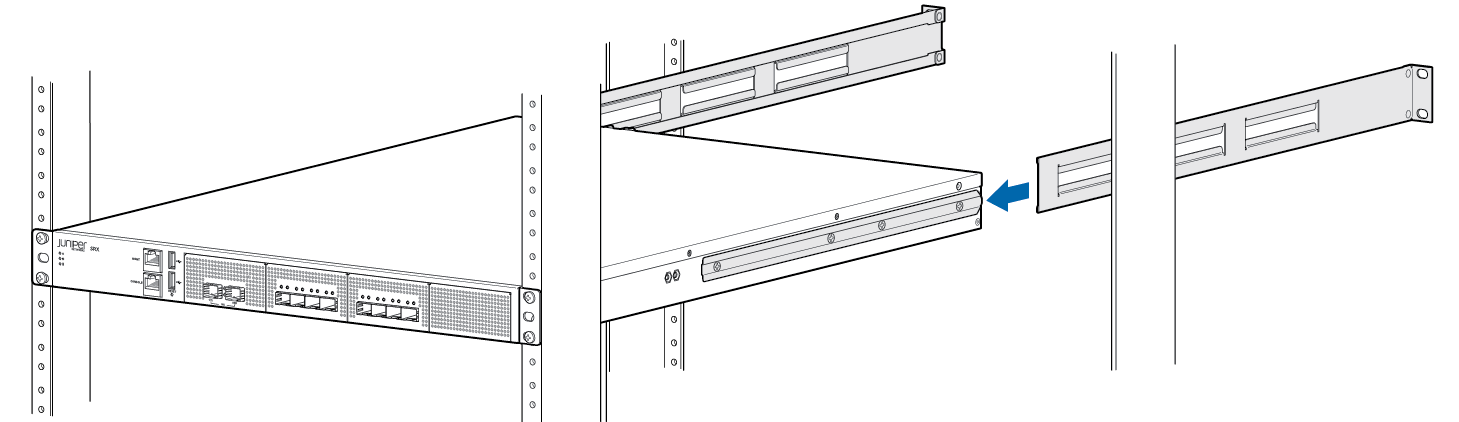
4. Secure the adjustable brackets to the rack, using the mounting screws

SRX4100/SRX4200 rack mount kit – rail
You can mount the services gateway on four posts in a 19-in. rack or cabinet by using the rack-mount kit shipped with the device.
To mount the services gateway in a four-post rack:
1. Attach the mounting ears to the front of the chassis, using the screws provided. Then, attach the fixed brackets to the rear of the device, using the screws provided.
2. Slide the device into the rack, and secure the mounting ears to the rack, using the mounting screws.
3. Slide the adjustable brackets into the fixed brackets attached to the rear of the device.
4. Secure the adjustable brackets to the rack, using the mounting screws