
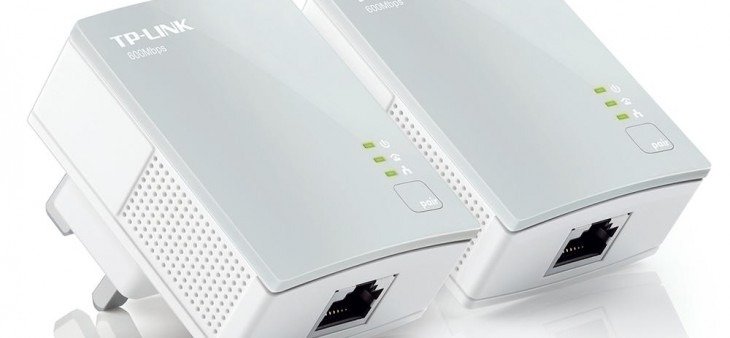
Powerline Adaptors are a great way of ensuring that a WiFi Network can reach every part of your house or office space without the need for cables running all over the place. Powerline Adaptors optimise the use of electricity within a property to ensure that WiFi signals are transmitted efficiently. Buy Powerline Adapters at Comms Express
Eliminate dead zones and laggy connections with the UK’s leading networking brand. By using your home’s electrical circuit, TP-Link Powerline adapters deliver high-speed internet to any room without the need for expensive rewiring.
Whether you need Wi-Fi 6 in the attic or a stable Gigabit connection for your gaming console, this guide reviews the best TP-Link solutions available at Comms Express.
Why Choose TP-Link Powerline?
TP-Link is the world’s No. 1 provider of WLAN products. Their Powerline range is specifically designed for the “plug-and-play” user:
- Ease of Use: “Pair” buttons allow for 128-bit AES encryption setup in seconds.
- Innovation: Features like OneMesh™ and EasyMesh allow you to create a seamless whole-home network using a single WiFi name.
- Stability: 2×2 MIMO with Beamforming (available in the 8 and 9 series) ensures faster and more stable connections over longer distances.
Best For: Recommendations by Use Case
1. The Ultimate Performance Pick (WiFi 6)
Model: TP-Link PGW2440 KIT G.hn2400 Powerline AX1800 Wi-Fi 6
- Best For: Households with ultra-fast gigabit broadband and 8K streaming.
- Key Tech: Next-Gen G.hn protocol providing superior speeds over traditional HomePlug AV2.
- Verdict: The most future-proof kit available.
2. Best for Whole-Home Mesh WiFi
Model: TP-Link TL-WPA8631P KIT AV1300 Gigabit
- Best For: Users who want to move from room to room without their connection dropping.
- Key Tech: OneMesh™ support and 3x Gigabit Ethernet ports for multiple wired devices.
3. Best Wired Performance (Gaming/NAS)
Model: TP-Link TL-PA9020P KIT AV2000 2-Port Gigabit
- Best For: Serious gamers and home office professionals requiring maximum wired stability.
- Key Tech: 2×2 MIMO for dedicated data lanes and a passthrough socket so you don’t lose a plug.
4. Best Reliable Budget Solution
Model: TP-Link TL-WPA7517 KIT AV1000 Gigabit
- Best For: Standard home use, HD streaming, and extending WiFi to one additional room.
- Key Tech: AV1000 speeds with AC1200 Dual-Band WiFi.
Comparison Table: TP-Link Powerline Range
| Model | Tech Standard | Max Speed | WiFi Included? | Ports |
| PGW2440 KIT | G.hn MIMO | 2400 Mbps | AX1800 (Wi-Fi 6) | 2+1 Gigabit |
| TL-PA9020P | HomePlug AV2 | 2000 Mbps | No (Wired Only) | 2x Gigabit |
| TL-WPA8631P | HomePlug AV2 | 1300 Mbps | AC1200 | 3x Gigabit |
| TL-WPA7617 | HomePlug AV2 | 1000 Mbps | AC1200 | 1x Gigabit |
| TL-WPA4220 | HomePlug AV | 600 Mbps | 300 Mbps | 2x Fast Eth |
How to Set Up Your TP-Link Powerline
- Connect: Plug your first adapter into a wall socket near your router and connect them via an Ethernet Cable.
- Plug & Play: Plug the second (WiFi) adapter into the room where the signal is weak.
- Sync: Press the ‘Pair’ button on both adapters to secure your network.
- Auto-Sync: For WiFi models, use the Wi-Fi Clone button to instantly copy your router’s SSID and password.
Expert Verdict
If you are starting a new network in 2026, we highly recommend the G.hn series (PGW2440 or PG2400P). While they aren’t compatible with older AV2 models, the G.hn protocol is significantly better at handling the “noise” of modern electrical appliances, ensuring your 8K streams and Zoom calls never drop.
Frequently Asked Questions (FAQ)
Are TP-Link G.hn adapters compatible with HomePlug AV2?
No. While they can coexist on the same electrical wiring, they use different protocols and cannot communicate with each other. If you are expanding an existing network, check your current model standard.
Can I add more adapters to my TP-Link kit?
Yes! You can add multiple TP-Link Powerline extenders to your network. Simply press the pair button on the new unit and one of your existing units to sync them.
What is the difference between OneMesh and EasyMesh?
OneMesh™ is a TP-Link exclusive technology for their own ecosystem. EasyMesh is a cross-brand standard. The newest TP-Link models support both, allowing for maximum flexibility.
Further Reading & Technical Guides
- Choosing the Right Ethernet Cable for Powerline
- TP-Link Access Points: Ultimate Business Guide
- Shop all TP-Link Networking Solutions
Browse the UK’s most trusted brands and high-performance infrastructure solutions. Project Planning? Get expert technical advice and custom quotes for large installations. Contact our expert sales team today.Shop the Full Range at Comms Express
