
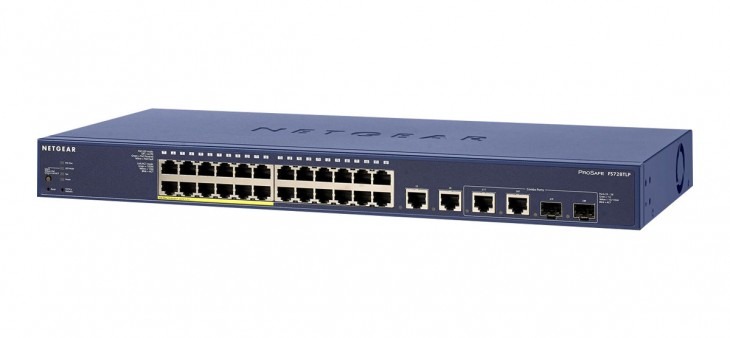
An Ethernet switch is a central networking device that operates primarily at Layer 2 (Data Link Layer) of the OSI model. Its core function is to connect multiple devices – such as computers, servers, and printers – within a Local Area Network (LAN). Unlike a hub, which broadcasts data to all ports, a switch uses Packet Switching to deliver data only to the specific device intended, significantly increasing network efficiency and security. Buy Network Switches | Managed, PoE, Unmanaged Ethernet Switches
1. How an Ethernet Switch Works (The “Logic” Layer)
- MAC Address Learning: When a device sends a data packet (frame), the switch records the source Media Access Control (MAC) address in its internal MAC Address Table.
- Filtering & Forwarding: The switch consults this table to determine which physical port the destination device is connected to.
- Collision Domains: Each port on a switch represents a separate collision domain, allowing for Full-Duplex communication (sending and receiving simultaneously).
2. Choosing the Right Type: Comparison Table
| Switch Type | Best For | Management Level | Key Features |
| Unmanaged | Home/Small Office | Plug-and-Play | No config, affordable, fixed settings. |
| Smart/Web-Managed | SMEs | Basic Web Interface | VLANs, basic QoS, Link Aggregation. |
| Fully Managed | Enterprise/DC | CLI/SNMP/Web | Deep security, L3 routing, mirroring. |
| PoE Switches | IP Cameras/VoIP | Power + Data | Eliminates need for external power outlets. |
3. Advanced Features for Modern Networks
Power over Ethernet (PoE)
PoE allows a single Ethernet cable to provide both data and electrical power.
- Standard (802.3af): Up to 15.4W per port.
- PoE+ (802.3at): Up to 30W (Ideal for PTZ cameras).
- PoE++ (802.3bt): Up to 60W-100W (High-power Wi-Fi 6/7 APs).
Layer 2 vs. Layer 3 Switching
While standard switches function at Layer 2, a Layer 3 Switch (or Multilayer Switch) can perform routing functions. This reduces the load on your main router by handling inter-VLAN routing internally at hardware speeds.
Stacking & Uplinks
For scalability, look for Stackable Switches that allow multiple units to be managed as a single entity via a high-speed backplane. Ensure your switch has SFP or SFP+ ports for fiber-optic uplinks to prevent bottlenecks.
4. FAQs: Troubleshooting & Strategy
Does a switch replace a router?
No. A switch creates a network (LAN), while a router connects that network to the internet (WAN).
What is “Non-Blocking” throughput?
This means the switch’s internal fabric can handle the total theoretical bandwidth of all ports at once (e.g., a 24-port Gigabit switch should have a 48Gbps switching capacity).
Can I mix 1Gbps and 10Gbps devices?
Yes. Modern switches feature Auto-Negotiation, which automatically adjusts the port speed to the slowest connected device’s maximum capability.
5. 2026 Buyer’s Checklist
- Port Count: Always buy 25% more ports than you currently need for “future-proofing.”
- Speed: Move to 2.5GbE or 10GbE for server uplinks and Wi-Fi 6/7 access points.
- Form Factor: Desktop (silent/fanless) vs. Rackmount (1U standard for cabinets).
- Energy Efficiency: Look for IEEE 802.3az (Energy Efficient Ethernet) to reduce power costs.
Shop the Full Range at Comms Express
Browse the UK’s most trusted brands and high-performance infrastructure solutions.
- Cabling & Racks
- Buy Network Cables
- Shop RJ45 Patch Leads
- Buy Patch Panels
- Shop Cat6 Cable
- Buy Fibre Patch Leads
- Shop Server Racks
- Buy Data Cabinets
- Networking & Power
- Shop Network Switches
- Buy UPS Systems
- Shop Rack PDUs
- Buy IP CCTV & Cameras
- Offers & Savings
- Shop Discounts
- Buy Multi-Buy Offers
- Our Top Brands
- Shop Ubiquiti | Buy TP-Link
- Shop Cisco | Buy Netgear
- Shop DrayTek | Buy D-Link
- Shop HPE Aruba | Buy APC
- Shop Teltonika | Buy Eaton
- Shop Excel | Buy Lindy
- Own Brands
- Shop Datacel | Buy CE Networking
Project Planning? Get expert technical advice and custom quotes for large installations. Contact our expert sales team today.