
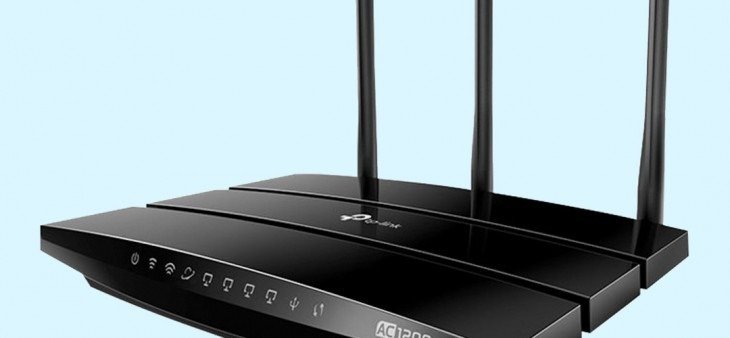
In an era of hyper-connectivity, the router is the unsung hero of the digital home and office. Whether you are streaming 8K content, managing a remote team, or scaling a business network, understanding your router is the first step toward a faster, more secure internet experience.
In this guide, we break down exactly what a router does, how it differs from a modem, and how to choose the best hardware for your specific needs. Shop Routers & Modems
What is a Router?
A router is a specialized networking device that acts as the “traffic director” for your data. Its primary job is to connect multiple, often disparate, networks together – most commonly bridging your home Local Area Network (LAN) with the global Wide Area Network (WAN), otherwise known as the internet.
By analysing incoming data packets, the router determines the most efficient path for information to travel, ensuring that your Zoom call doesn’t end up on your smart fridge and your private files stay within your local network.
Key Functions and Features
- Data Routing: Uses complex routing tables and protocols (like BGP and OSPF) to map the fastest path for data.
- Traffic Management: Acts as a gateway, ensuring every data packet reaches the specific device intended.
- Security & Privacy: Features like Firewalls, WPA3 encryption, and Network Address Translation (NAT) hide your private IP addresses from external threats.
- Wireless Connectivity: Modern Wireless Routers include Wi-Fi 6E or Wi-Fi 7 capabilities to connect mobile devices without physical cables.
Router vs. Modem: What’s the Difference?
While often housed in the same plastic box provided by your ISP, these two devices perform very different roles.
| Feature | Modem | Router |
| Primary Role | Brings the internet into your home. | Shares that internet with your devices. |
| Connection | Connects to the ISP (via Fibre, Coax, or Phone line). | Connects to the Modem and your LAN. |
| Network | Communicates with the Wide Area Network (WAN). | Creates a Local Area Network (LAN). |
| Devices | Typically connects to only one device at a time. | Connects dozens of wired and wireless devices. |
Buy Routers at Comms Express
 Expert Tip: If you want to improve your speeds, you often only need to upgrade your router. For a deep dive, see our guide on how the internet works.
Comparison Table: Types of Routers
Choosing the right architecture is essential for performance.
| Router Type | Best For | Key Advantage |
| Wireless/Wi-Fi Routers | Homes & Small Offices | Simple setup; provides both wired and Wi-Fi. |
| Mesh Wi-Fi Systems | Large Homes / Thick Walls | Eliminates dead zones using multiple “nodes.” |
| Edge Routers | Business Perimeters | High security; manages traffic between private & public networks. |
| Core Routers | ISPs / Data Centres | Extreme bandwidth; handles the internet backbone. |
| VPN Routers | Remote Workers / Privacy | Encrypts all network traffic at the hardware level. |
Why Choose a Professional Router?
Most “free” routers provided by ISPs are entry-level devices. Upgrading to a professional-grade solution from brands like DrayTek, Ubiquiti, or TP-Link offers:
- Superior Range: Better antennas and beamforming technology.
- Higher Capacity: Handles 50+ devices without “bottlenecking.”
- Advanced Security: Content filtering and VLANs to isolate guest users.
- Reliability: Better heat dissipation and hardware that doesn’t need a weekly “reboot.”
Recommendations: Best Routers for 2026
Depending on your intent, we recommend the following category leaders available at Comms Express:
- Best for Small Business: DrayTek Vigor 2865 Series – A “gold standard” for reliability with robust firewall features.
- Best for Power Users & Gamers: Ubiquiti UniFi Cloud Gateway Max – Ultra-low latency and 2.5GbE ports.
- Best for Value/Home Office: TP-Link Omada Series – Professional features at a consumer-friendly price point.
- Best for Mobile/Remote Sites: 4G/5G LTE Routers – Perfect for temporary offices or rural areas.
How to Set Up Your Router for Peak Performance
- Placement: Centralize your router. Avoid placing it inside cupboards or near large metal objects.
- Cabling: Use Cat6 or Cat6a Ethernet Cables for fixed devices (consoles, PC, TV) to free up Wi-Fi bandwidth.
- Update Firmware: Always check for updates upon unboxing to patch security vulnerabilities.
- Change Credentials: Never keep the default “admin” password.
Router Buying Checklist: 5 Steps to the Right Choice
1. Match Your Speed Plan
There is no point in buying a 10Gbps router if your ISP only provides 100Mbps.
- Standard Broadband (Up to 100Mbps): A budget-friendly Wi-Fi 6 router is plenty.
- Superfast Fibre (500Mbps – 1Gbps): Look for Wi-Fi 6E or Wi-Fi 7 to ensure wireless speeds don’t bottle-neck your wired potential.
- Ultrafast (2Gbps+): Prioritize routers with Multi-Gig (2.5GbE or 10GbE) WAN/LAN ports.
2. Evaluate Your Coverage Area
- Small Flats (<1,500 sq ft): A single high-gain router (like an Asus RT series) is usually more efficient and cheaper.
- Large Homes or Offices (>2,500 sq ft): Choose a Mesh Wi-Fi System. This uses multiple “nodes” to blanket the entire area under one network name.
- Thick Walls/Multiple Floors: Look for Tri-band or Quad-band routers. These have a dedicated “backhaul” frequency so the nodes can talk to each other without slowing down your devices.
3. Consider Your Device Density
Count everything: phones, laptops, smart bulbs, cameras, and even your fridge.
- 20+ Devices: Ensure the router supports MU-MIMO and OFDMA. These technologies allow the router to talk to multiple devices simultaneously rather than making them wait in a digital “queue.”
- Smart Home Heavy: If you have dozens of IoT sensors, look for a router with a strong internal processor (Quad-core) to manage the constant background traffic.
4. Professional & Security Features
- Remote Working: If you use a corporate VPN, look for a router that supports VPN Passthrough or can act as a VPN Client itself.
- Guest Access: Ensure the router can create a separate Guest SSID so visitors can’t access your private files or printers.
- Failover Protection: For businesses, a 4G/5G Failover Router will automatically switch to mobile data if your main fibre line goes down.
5. Future-Proofing for 3–5 Years
- Wi-Fi 7 (802.11be): While still emerging, Wi-Fi 7 is the gold standard for 2026. It handles congestion better and offers the lowest latency for gaming and VR.
- WPA3 Security: Don’t buy a router in 2026 that only supports WPA2. WPA3 is the latest encryption standard and is essential for modern security.
Summary: Router vs. Mesh
| Feature | Traditional Router | Mesh Wi-Fi System |
| Best For | Small spaces & Power gamers | Large homes & Multi-floor offices |
| Performance | Faster “peak” speed near the router | Consistent speed in every room |
| Simplicity | One device to plug in | Managed via a single app |
| Cost | Generally more affordable | Higher upfront investment |
Expert Verdict
For most UK households, a high-quality Wi-Fi 6 or 6E router is the “sweet spot” for performance and price. However, if you are running a business or have a home with significant “dead zones,” investing in a Mesh System or a dedicated Network Switch to hardwire your rooms is the only way to guarantee 100% uptime.
Router FAQ
1. What is the difference between a router and a modem? A modem is the device that brings the internet signal from your ISP (Internet Service Provider) into your home or office. A router is the device that takes that signal and distributes it – either via Wi-Fi or Ethernet cables—to all your various devices like laptops, phones, and smart TVs. While some ISPs provide a “gateway” (a modem and router in one), using a dedicated Broadband Router often provides better speed and security.
2. How does a router actually work? A router works by analysing “data packets” sent from your devices. It reads the destination address of each packet and uses its “Routing Table” to determine the most efficient path across the network. It essentially acts as a digital traffic controller, ensuring data reaches the correct device without collisions or delays.
3. Do I need a Wi-Fi 7 router for my home or office? If you have a gigabit-plus internet connection or use high-bandwidth applications like 8K streaming and VR, a Wi-Fi 7 router is a future-proof investment. It offers significantly lower latency and higher capacity compared to Wi-Fi 6, making it ideal for environments with many connected devices.
4. Can a router improve my internet speed? Yes. While a router cannot increase the speed provided by your ISP, an old or low-quality router can “bottleneck” your connection. Upgrading to a professional-grade router with better processors and antennas ensures you are actually receiving the full bandwidth you pay for, especially over wireless connections.
5. How do I make my router more secure? To protect your network, you should always change the default admin password, enable WPA3 encryption, and keep your firmware updated. For higher security, consider a router with a built-in Firewall or the ability to create a separate VLAN (Virtual Local Area Network) for guest users and IoT devices.
6. What is a Mesh Wi-Fi system and do I need one? A Mesh Wi-Fi system uses multiple nodes placed around a building to create a single, seamless network. If you have a large property or thick walls that cause “dead zones,” a Mesh system is more effective than a single traditional router for providing consistent coverage.
Further Reading & Technical Guides
Explore our InfoZone for deep-dive technical resources:
- How to Set Up a Professional Home Network
- The Ultimate Guide to Ethernet Cables (2026)
- Understanding Layer 3 Switching vs. Routing
- How to Connect Two Routers to One Network
Shop the Best Routers at Comms Express
Now that you know how a router works, find the perfect model to power your network. We stock everything from WiFi 7 home hubs to secure enterprise gateways.
- Home & Small Office
- Buy TP-Link WiFi Routers
- Shop Netgear Nighthawk
- Buy ASUS Modem Routers
- Shop D-Link Solutions
- Business & Enterprise
- Buy DrayTek Vigor Routers
- Shop Cisco Business Routers
- Buy UniFi Ultra Routers
- Shop UniFi Gateways
- Specialist & Industrial
- Buy Teltonika IoT Routers
- Shop Industrial Mobile Routers
- Buy Next-Gen WiFi 7
- Browse All Routers
Struggling with WiFi dead zones? Sometimes a better router needs a little help. If you’re unsure if you need a Mesh system or a standard high-gain router, contact our networking team for expert advice.
