
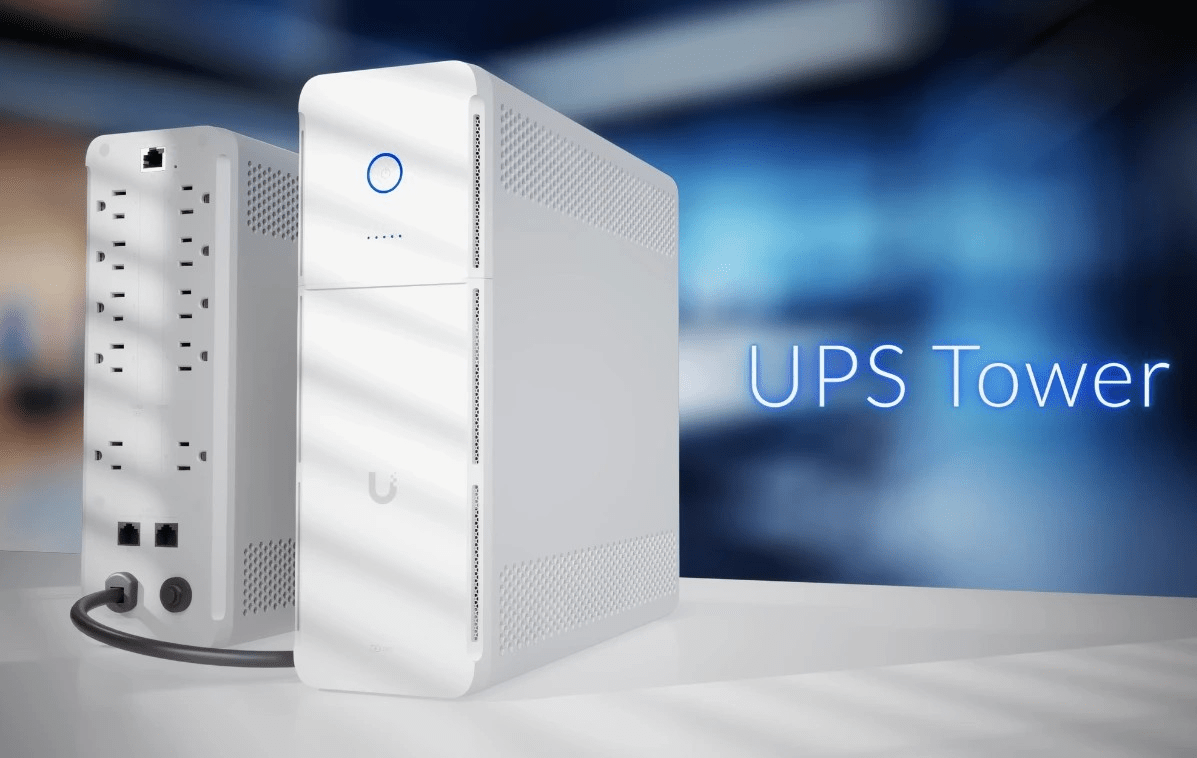
Ubiquiti UPS-Tower — Reliable Backup Power for Modern UniFi Networks, now available at Comms Express
As business networks become more powerful, they also become more dependent on clean, uninterrupted power. Even brief outages can cause downtime, data loss, and disrupted services — especially for organisations running UniFi switching, routing, and access infrastructure.
Ubiquiti’s answer is here: the Ubiquiti UPS-Tower, now available from Comms Express UK. Designed specifically to integrate with UniFi environments, it delivers intelligent monitoring, automatic voltage regulation, and a compact tower form factor ideal for offices, server rooms, and network comms closets.
Buy the Ubiquiti UPS-Tower at Comms Express
What Is the Ubiquiti UPS-Tower?
The Ubiquiti UPS-Tower UniFi Desktop Uninterruptible Power Supply is a UniFi-managed 1,000 VA / 600 W line-interactive UPS designed to deliver short-term power continuity and voltage stabilisation for critical desktop and network equipment. Featuring ten C13 outlets, a hot-swappable battery, and integrated Ethernet management, it provides controlled shutdown and monitoring through UniFi Alarm Manager and NUT-compatible systems.
Key Features
- 1,000 VA / 600 W line-interactive UPS with automatic voltage regulation (AVR)
- Five (5) battery backup & surge-protected C13 outlets plus five (5) surge-only C13 outlets
- Hot-swappable 12V 9Ah sealed lead-acid battery
- Half-load (300 W) runtime of approximately 7 minutes
- Full-load (600 W) runtime of approximately 2 minutes
- 6 ms typical (10 ms maximum) transfer time to battery
- Built-in Ethernet port for network management
- Two (2) 1GbE surge-protected Ethernet passthrough ports
- UniFi Alarm Manager integration with NUT support for third-party devices
- Supplied with UK (Type G) power cable
Power Capacity and Runtime
The UPS-Tower delivers up to 1,000 VA / 600 W of line-interactive power, suitable for protecting network appliances, desktops, and peripheral equipment. At full load the system provides approximately 2 minutes of runtime, while half-load operation extends this to around 7 minutes — allowing sufficient time for controlled graceful shutdown procedures.
Outlet Configuration
Ten IEC C13 outlets are divided into five battery-backed and surge-protected outlets for critical equipment, and five surge-only outlets for secondary devices. All ten outlets provide surge protection, allowing administrators to prioritise essential hardware while protecting everything connected.

Ubiquiti UPS-Tower — Available Now at Comms Express
UniFi Integration & Network Monitoring
With native UniFi Alarm Manager compatibility, administrators can monitor power status, battery health, and runtime directly alongside their network infrastructure — simplifying management and reducing troubleshooting time. NUT (Network UPS Tools) support extends this to Linux, Windows, macOS, and BSD hosts, enabling automated graceful shutdown workflows without proprietary software dependency.
Tower Form Factor for Flexible Deployment
The compact tower design makes the Ubiquiti UPS-Tower ideal for small to medium business networks, edge deployments, office IT rooms, and comms closets. It delivers enterprise-grade power protection without requiring a full rack-mount installation.
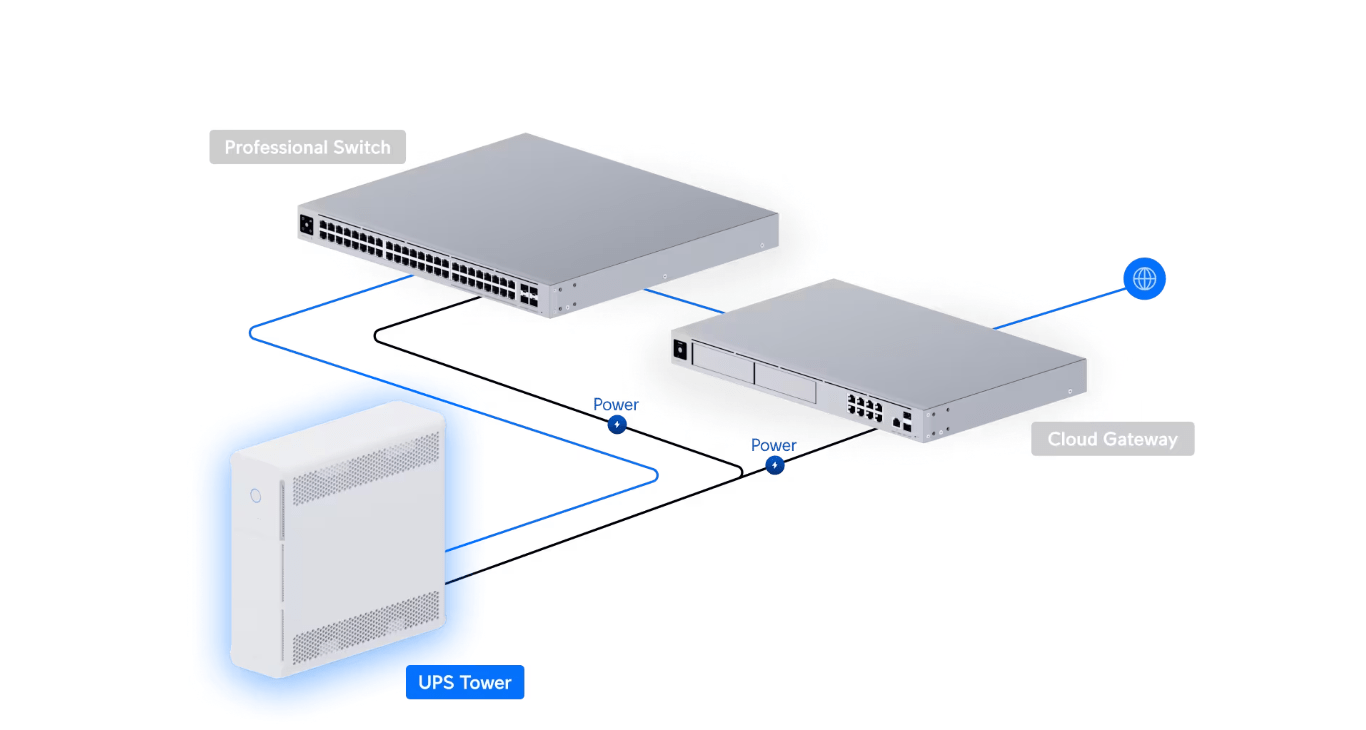
Ubiquiti UPS-Tower — Flexible Deployment
Designed for Business Continuity
By providing clean, stable backup power, the UPS-Tower allows critical systems to shut down safely during extended outages — protecting data, hardware, and network uptime. Cold start support means the unit can power devices directly from battery even with no utility power present.
Ideal Use Cases
The Ubiquiti UPS-Tower is well-suited for:
- SMEs running UniFi networks
- Education and healthcare environments
- Retail and hospitality sites
- Managed service providers (MSPs)
- Remote and branch office deployments
Anywhere network uptime matters, a dedicated UniFi-ready UPS makes a measurable difference.
Strengthen Your UniFi Network with Reliable Power
Power protection is no longer optional for modern networks. The Ubiquiti UPS-Tower delivers a purpose-built, intelligent backup solution that aligns perfectly with UniFi infrastructure — keeping networks online when it matters most.
The Ubiquiti UPS-Tower is available now at Comms Express. Explore the full specifications and order today to give your UniFi network the power protection it deserves.
Shop the Ubiquiti UPS-Tower at Comms Express
Frequently Asked Questions
1. Is the battery hot-swappable?
Yes. The UPS-Tower supports hot-swappable battery replacement via the front panel, allowing the 12V 9Ah battery to be changed without powering down connected equipment.
2. What devices should not be plugged into the Ubiquiti UPS-Tower?
Avoid connecting high-power appliances such as laser printers, vacuum cleaners, hair dryers, microwaves, air conditioners, and refrigerators. Motor- or compressor-driven equipment, devices with high inrush current, and anything exceeding the 600 W rated wattage should not be connected. These can overload the UPS, trigger protection shutdown, or shorten battery lifespan.
3. Why does the UPS-Tower report an overload?
An overload is reported when the total connected load exceeds the 600 W rating, or when a device draws high inrush current during startup. Check connected devices and reduce load if this occurs.
4. Can the UPS-Tower be cold started?
Yes. The UPS-Tower can start directly from battery when utility power is absent, making it suitable for remote deployments and areas with extended outages.
5. How does the UPS-Tower operate when there is no power interruption?
When utility power is available, the UPS-Tower draws power directly from the mains while charging its internal battery. The built-in AVR (Automatic Voltage Regulation) maintains stable output within 170–280 V (EU) without switching to battery mode.
6. What information can the NUT server provide?
Battery Status: charge level, voltage, runtime to empty.
Power Input: real-time input voltage, nominal input voltage, high and low voltage transfer thresholds.
Power Output: real-time and nominal output voltage, output current, real-time and nominal output power.
System Information: UPS status, serial number, type, self-test result, and self-test date.
7. How many clients can the UPS NUT server support?
The UPS-Tower NUT server supports up to 3 clients simultaneously.
