
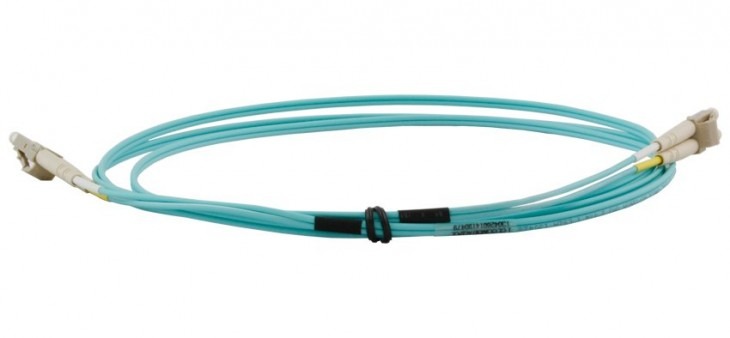
Ever wondered how you can binge-watch shows in crystal clear quality or download massive files in seconds? The answer lies in a thin, hair-like strand of glass: Fibre Optic Cable.
Fibre optic cables are revolutionizing communication. Unlike traditional copper cables that transmit data using electricity, fibre optics use pulses of light. This shift in technology unlocks unprecedented speed, bandwidth, and reliability for modern networks.
Why Choose Fibre Optic Cables?
Switching to fibre optic solutions offers several mission-critical advantages over standard copper cabling:
-
- Immense Bandwidth: Capable of handling far more data than traditional UTP cables.
- Long-Distance Transmission: Signals travel further with significantly less “attenuation” (signal loss).
- Electromagnetic Immunity: Because they use light, they are immune to electrical interference and lightning strikes.
- Future-Proofing: Modern OM4 Multimode and OS2 Singlemode cables support speeds up to 100Gbps and beyond.

Recommendations: Which Fibre is Best for You?
Selecting the right cable depends on your distance requirements and hardware:
- Best for Data Centres & High-Speed LANs: OM4 Multimode Fibre. Optimized for 10Gb, 40Gb, and 100Gb Ethernet over shorter distances.
- Best for Office Networking: OM3 Multimode Fibre. The standard “aqua” cable ideal for 10Gbps up to 300 metres.
- Best for Long Distance (Campus/WAN): OS2 Singlemode Fibre. Designed for spans of kilometres, offering virtually unlimited bandwidth.
- Best for Rapid Deployment: Pre-Terminated Fibre Optic Cable. Plug-and-play solutions that remove the need for on-site splicing.
Comparison Table: Multimode vs. Singlemode
| Feature | Multimode (OM3/OM4) | Singlemode (OS2) |
| Core Size | 50/125 Micron | 9/125 Micron |
| Light Source | VCSEL / LED | Laser |
| Max Distance | Short (Up to 400m – 550m) | Long (Up to 10km – 40km+) |
| Typical Use | LANs, Server Rooms | WANs, Telco, CCTV |
| Cost of Optics | Lower Cost Transceivers | Higher Cost Transceivers |
How To: Selecting and Installing Fibre Patch Leads
- Identify the Connector: Check your equipment. Common types include LC (small), SC (square), or ST (round/twist). Most modern switches use LC to LC Patch Leads.
- Match the Mode: Ensure your patch lead matches the backbone cabling. Never mix Singlemode (Yellow) with Multimode (Aqua/Violet).
- Check the Polarity: Most installations require a Duplex Fibre Patch Cable, which features two fibres—one for transmitting and one for receiving.
- Clean Before Connecting: Even a microscopic dust particle can block the light path. Use a fibre cleaning tool before plugging in.
Expert Verdict
If you are upgrading a modern server room or office, OM4 Multimode is our top recommendation for internal links due to its high bandwidth and lower transceiver costs. However, for links between buildings or across large campuses, OS2 Singlemode is the only logical choice. To save on installation time and labour costs, always consider Pre-Terminated options.
Frequently Asked Questions (FAQ)
What is a fibre optic cable?
A fibre optic cable is a thin strand of glass or plastic that transmits data using light pulses. These cables enable high-speed internet and reliable data transfer over long distances.
What is the difference between Simplex and Duplex?
Simplex cables contain one fibre (one-way communication), while Duplex cables contain two fibres, allowing for simultaneous two-way (bi-directional) data transfer.
Can I connect Singlemode to Multimode?
No. Because the core sizes are vastly different (9 micron vs 50 micron), connecting them directly causes massive signal loss. You must use a media converter or mode-conditioning patch lead.
Further Reading & Technical Guides
- Fibre Optic Cable Transmission Speed Guide
- Understanding Patch Lead & Cable Terminology
- The Ultimate Guide to Network Cables
Need help choosing the right specs? Contact our expert team today for a tailored cabling solution.
Shop the Full Range at Comms Express
Browse the UK’s most trusted brands and high-performance infrastructure solutions.
- Cabling & Racks
- Buy Network Cables
- Shop RJ45 Patch Leads
- Buy Patch Panels
- Shop Cat6 Cable
- Buy Fibre Patch Leads
- Shop Server Racks
- Buy Data Cabinets
- Networking & Power
- Shop Network Switches
- Buy UPS Systems
- Shop Rack PDUs
- Buy IP CCTV & Cameras
- Offers & Savings
- Shop Discounts
- Buy Multi-Buy Offers
- Our Top Brands
- Shop Ubiquiti | Buy TP-Link
- Shop Cisco | Buy Netgear
- Shop DrayTek | Buy D-Link
- Shop HPE Aruba | Buy APC
- Shop Teltonika | Buy Eaton
- Shop Excel | Buy Lindy
- Own Brands
- Shop Datacel | Buy CE Networking
Project Planning? Get expert technical advice and custom quotes for large installations. Contact our expert sales team today.