
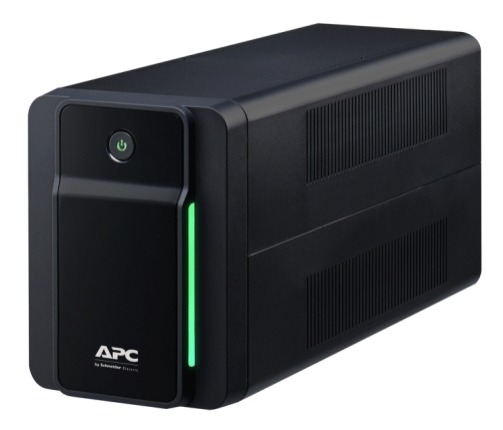
In an era of mission-critical data, understanding the nuances of power protection is vital. Choosing the right Uninterruptible Power Supply (UPS) ensures your hardware remains operational during surges, sags, and total outages.
Shop Uninterruptible Power Supply (UPS) Solutions at Comms Express.
What are the 3 Main Types of UPS Systems?
There are three primary architectures used in modern UPS systems: Standby (Offline), Line-Interactive, and Online (Double Conversion). While they all provide battery backup, the way they handle power filtration and transition differs significantly.
1. Standby UPS (Offline UPS)
The Standby UPS is the most basic and cost-effective battery backup solution. Under normal conditions, it passes utility power directly to the connected devices.
- How it Works: The unit monitors the incoming voltage. When it detects a failure or a significant drop (brownout), it switches to the internal battery and inverter.
- Best For: Home offices, basic POS terminals, and non-critical desktop PCs.
- Pros: High efficiency, low cost, compact size.
- Cons: Minimal surge protection and a slight “transfer time” (milliseconds) when switching to battery.
2. Line-Interactive UPS
A Line-Interactive UPS is the standard choice for small-to-medium business environments. It features an autotransformer that regulates voltage without constantly switching to the battery.
- How it Works: It can handle “under-voltages” (brownouts) and “over-voltages” (surges) by adjusting the output to a safe level. This preserves battery life for actual power cuts.
- Best For: Network servers, storage arrays, and network switches.
- Key Advantage: Offers better power conditioning than Standby units while remaining more affordable than Online systems.
- Shop Range: Explore our Line-Interactive UPS Category for reliable office protection.
3. Online UPS (Double Conversion)
For mission-critical infrastructure, the Online UPS is the gold standard. It provides the highest level of protection by completely isolating the equipment from the raw utility power.
- How it Works: It uses “Double Conversion” technology. Incoming AC power is converted to DC to charge the battery and then converted back to perfectly “clean” AC power for the equipment. There is zero transfer time because the inverter is always providing the power.
- Best For: Data centres, medical equipment, and high-end enterprise servers.
- Pros: Total isolation from power disturbances, zero switchover time, and pure sine wave output.
- View Products: See our professional Double Conversion UPS models for maximum uptime.
Comparison Table: Standby vs Line-Interactive vs Online
| Feature | Standby (Offline) | Line-Interactive | Online (Double Conversion) |
| Typical Use | Home/Small Office | Small/Medium Business | Data Centres/Critical IT |
| Voltage Regulation | None | Automatic (AVR) | Constant (Double Conversion) |
| Transfer Time | 5-10 ms | 2-4 ms | 0 ms (Instant) |
| Cost | Low | Medium | High |
Final Summary: Choosing the Right Brand for Your Infrastructure
Selecting the right Uninterruptible Power Supply (UPS) depends on balancing budget with the criticality of your data. For a deep dive into the specific models currently leading the market, start with our Review of the Top 8 UPS devices to see how they perform in real-world scenarios.
If you have a preferred brand ecosystem, explore the specialized ranges below:
- APC UPS – Uninterruptible Power Supply: The industry standard for SMBs and networking closets. Known for the Smart-UPS line and user-friendly SmartConnect cloud monitoring.
- Eaton UPS – Uninterruptible Power Supply: Often cited by IT managers for superior reliability and efficiency. The 9PX series is a favourite for virtualization and high-density server environments.
- Vertiv UPS – Uninterruptible Power Supply: A leader in enterprise-grade protection, specifically designed for data centers and edge computing where modularity and deep telemetry are required.
- Tripp Lite UPS – Uninterruptible Power Supply: Now part of the Eaton family, Tripp Lite offers excellent value and cost-effective power protection for non-mission-critical office hardware and retail setups.
Key Takeaways for Power Protection
- Match Topology to Need: Use Standby for basic home gear, Line-Interactive for office servers, and Online Double Conversion for critical infrastructure.
- Size Matters: Always calculate your total wattage and add a 20-25% buffer to account for future growth and avoid overloads.
- Battery Maintenance: Plan for battery replacements every 3–5 years for Lead-Acid, or consider Lithium-Ion models for a 10-year lifespan.
Frequently Asked Questions: Expert Guide to UPS Systems
To help you find the best power protection for your needs, we’ve answered the most common questions regarding Uninterruptible Power Supply (UPS) technology and applications.
What is a UPS device?
During power surges and failures, Uninterruptible Power Supply (UPS) devices keep computer systems and IT equipment safe and operational. A UPS provides battery backup power when the flow of electricity drops to an inadequate voltage, or if it stops. An uninterrupted power source is vital for the mission-critical environment. Depending on the size and technology of the UPS unit, backup power is provided for a specific period of time, until generators can be activated or network components can be properly shut down. When electricity flows adequately, computers and accessories are protected from damage. A UPS unit can help to shield a single device or an entire data centre effectively. See our Our Top 8 Best UPS (Uninterruptible Power Supplies) In The UK (2026)
What are the different types of UPS?
There are three main types of UPS systems available to accommodate a complete range of applications, meeting enterprise and consumer needs. A Standby UPS is an offline unit that can detect an electrical failure and switch to battery power automatically. The two other UPS categories are Line Interactive and Online Devices, with online being the more expensive option. Each type of UPS keeps network devices operational when power is unavailable. Features, such as energy metering, vary by model.
What is a Standby UPS?
The basic Standby UPS is an uninterruptible power source that delivers short-term, battery-sourced power during outages. With this category of UPS, hardware receives utility power, under normal conditions, through a direct AC connection. The standby unit and its inverter are essentially on hold until backup power is needed. Depending upon the model, a standby UPS device can also safeguard data and sensitive equipment from surges, spikes, and dips. Compact devices are available for home network protection.
A Standby UPS is commonly used to protect computers, modems, VoIP equipment, and other hardware. This category of UPS is the least expensive of the three UPS types. It is also referred to as a Backup UPS or Offline UPS. Following a blackout, it delivers power for short periods; the transfer switch initiates backup processes in milliseconds. While not instantaneous, it is designed not to interrupt the flow of power to standard equipment.
What is Online UPS?
An Online UPS is a type of uninterruptible power supply that utilises either a double or delta conversion technology.
- Double Conversion: AC power travels to a rectifier (becomes DC), then to the battery, and then an inverter (back to AC). This ensures computing equipment receives continually “clean” power.
- Delta Conversion: An energy-efficient alternative where some power is sent directly to the equipment, skipping certain processing steps to save power.
If an electrical failure occurs, an Online UPS system maintains consistent current flow. The circuitry is seamless with zero transfer time, which is why Online units cost more than those in the offline or line-interactive UPS categories. These are ideal for network servers, data centres, and sensitive medical environments.
What is Line-interactive UPS?
A Line-interactive UPS is a type of uninterruptible power source that can regulate voltage automatically. This technology responds to high and low voltage conditions (brownouts and surges) using an autotransformer without draining the battery.
- Applications: These systems safeguard sensitive equipment during power fluctuations.
- Cost: They are more expensive than standby models but more affordable than an online UPS unit.
- Performance: A Line-interactive UPS maintains performance during low voltage situations and allows for safe shutdowns during lengthy outages.
What is the difference between Online vs. Line-Interactive UPS?
The primary difference lies in how they handle incoming power. A Line-Interactive UPS uses an autotransformer to regulate voltage and has a small transfer time (milliseconds) when switching to battery. In contrast, an Online UPS uses an inverter to provide power at all times, ensuring zero transfer time and total isolation from utility power disturbances. For mission-critical hardware that cannot tolerate even a tiny power dip, the Online UPS is the necessary choice.
What is the difference between a UPS and a Surge Protector?
A surge protector only filters high-voltage spikes to prevent hardware damage. An Uninterruptible Power Supply (UPS) does this too, but it also provides instant battery backup during power drops, brownouts, and total outages, allowing you to save work and shut down safely.
How long will a UPS keep my computer running?
Runtime depends on the VA/Wattage rating of the battery and the power draw of your connected devices. Most standard UPS systems provide 5 to 20 minutes of backup—enough time for a safe shutdown. For extended runtimes, you should look at Online Double Conversion UPS models that support external battery packs.
What is “Pure Sine Wave” and do I need it?
Utility power is delivered as a Pure Sine Wave. Basic Standby UPS units often produce a “Simulated” or “Modified” sine wave. While fine for basic electronics, sensitive equipment like high-end gaming PCs (with Active PFC power supplies), medical gear, and iMacs require a Pure Sine Wave UPS to function correctly and avoid hardware hum or damage.
How do I calculate what size UPS I need?
Total the wattage of all devices you plan to plug in (e.g., PC + Monitor + Router). We recommend choosing a UPS with a Wattage capacity 20-25% higher than your total load to account for power spikes and future expansion. Check our Top 8 UPS Review for a breakdown of capacity vs. load.
How often do UPS batteries need replacing?
Most standard Lead-Acid (VRLA) batteries last between 3 to 5 years. Factors like high room temperature and frequent discharging can shorten this lifespan. Many modern APC UPS and Eaton UPS units feature self-testing and “Replace Battery” indicators to warn you before a failure occurs.