
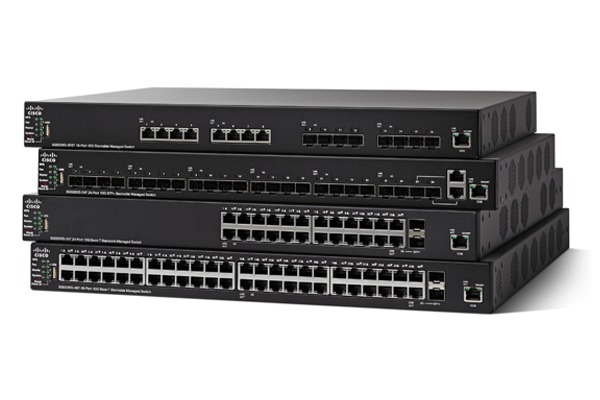
In modern networking, scalability is the difference between a seamless upgrade and a complete hardware overhaul. Stackable switches offer a versatile solution for growing businesses, allowing multiple independent units to function as a single logical device. Whether you are managing a small office or a high-density data centre, understanding how to leverage stackable architecture is key to simplifying management and increasing port density.
What is a Stackable Switch?
A stackable switch is a fully functional, standalone network switch that can be connected to other switches of the same series to operate as a single unit. When “stacked,” these devices share a single IP address and management interface, combining their port capacities into one large, high-performance system.
Key Characteristics:
- Unified Management: Manage 4, 8, or even 12 switches through one dashboard.
- Increased Density: Commonly available in 24-port and 48-port configurations.
- Resiliency: If one switch in the stack fails, the others continue to route data, minimizing downtime.
Why Choose Stackable Switches?
For many IT managers, the choice is between a fixed-port switch, a stackable switch, or a modular chassis. Here is why stacking often wins:
- Lower Initial Investment: Start with one switch and add more as your team grows. Unlike chassis systems, you don’t pay for empty slots upfront.
- Simplified Operations: Instead of configuring VLANs and security protocols on 10 different devices, you apply them once to the stack.
- High-Speed Interconnectivity: Modern stacks use dedicated stacking cables (often via SFP+ or QSFP ports) that provide much higher bandwidth than traditional patch cable trunking.
Stackable vs. Chassis-Based Switches
| Feature | Stackable Switches | Modular Chassis |
| Initial Cost | Low (Pay-as-you-grow) | High (Base chassis cost) |
| Footprint | 1U per unit (Flexible) | Large (Requires specific rack space) |
| Management | Single Logical Unit | Single Logical Unit |
| Reliability | Distributed (N+1 redundancy) | Centralised (Backplane dependent) |
| Power | Individual power supplies | Shared, redundant power bays |
Best Recommendations for 2026 – Buy Network Switches
Depending on your network requirements, we recommend these industry-leading stackable solutions:
- Best for Small Businesses: Cisco Business 350 Series – Offers intuitive management and robust security at a competitive price point.
- Best for Enterprise/Core: Cisco Catalyst 9200/9300 – The gold standard for stacking, featuring StackWise technology for massive throughput.
- Best Value for Money: D-Link DGS-3130 Series – Provides high-end features like L3 routing and 10G stacking ports without the premium price tag.
- Best for PoE Requirements: NETGEAR M4300 Series – Ideal for VoIP and surveillance, allowing “mixed-stacking” of different models.
How to Set Up a Switch Stack
- Check Compatibility: Ensure all switches are from the same series and running compatible firmware.
- Physical Connection: Use dedicated stacking cables to connect the stacking ports on the rear of the units in a “ring” or “chain” topology.
- Power On: Turn on the intended “Master” switch first, followed by the “Member” switches.
- Configuration: Access the management console via the Master switch’s IP address. The system will automatically detect the additional ports.
Expert Verdict
Stackable switches represent the most logical path for businesses that anticipate growth. They bridge the gap between simple unmanaged switches and expensive modular chassis systems. By choosing a stackable architecture, you gain the administrative ease of a large device with the flexibility and cost-efficiency of smaller units.
Frequently Asked Questions
1. What is the difference between stacking switches and trunking (Uplinking)?
While both connect switches, stacking merges multiple switches into a single logical unit with one management IP, sharing a unified “backplane” for data. Trunking (or Uplinking) simply connects two independent switches via standard Ethernet or Fiber ports, requiring you to manage each device separately. Stacking is the preferred choice for reducing management complexity in growing networks.
2. Can I stack switches from different brands or series?
In 99% of cases, no. Stacking relies on proprietary hardware and software protocols (like Cisco’s StackWise or NETGEAR’s stacking firmware). To ensure compatibility, you should stick to the same model family, such as the Cisco Catalyst 9200 Series. Using different brands will require you to connect them via standard uplinks rather than a true stack.
3. Does stacking switches increase network bandwidth?
Yes. Stacking typically uses dedicated high-speed ports (often 10G, 40G, or even 100G) that provide a much higher “stacking bandwidth” than a standard patch lead connection. This prevents bottlenecks when data travels between different units in the rack, ensuring line-rate performance across all ports in the stack.
4. What happens if the Master Switch in a stack fails?
Stackable switches are designed for high availability. If the “Master” switch fails, the stack automatically elects a “Standby” switch to take over management instantly. This failover process ensures that data continues to flow through the remaining switches in the stack, significantly reducing potential downtime compared to standalone units.
5. Are stackable switches more expensive than standalone managed switches?
The initial cost per unit may be slightly higher due to the specialized stacking hardware and ports. However, the Total Cost of Ownership (TCO) is often lower because you save significantly on “man-hours” by managing one device instead of ten. Additionally, stackable units allow for a “pay-as-you-grow” model, avoiding the massive upfront cost of a modular chassis.
Further Reading & Technical Guides
- Ultimate Guide to Surge Protection (SPD)
- Cat5e vs Cat6: Which Cable Should You Choose?
- Understanding PoE and PoE+
- How to Choose the Right Network Switch for Your Business (SME vs Enterprise)
Shop the Full Range at Comms Express
Browse the UK’s most trusted brands and high-performance infrastructure solutions.
- Cabling & Racks
- Buy Network Cables
- Shop RJ45 Patch Leads
- Buy Patch Panels
- Shop Cat6 Cable
- Buy Fibre Patch Leads
- Shop Server Racks
- Buy Data Cabinets
- Networking & Power
- Shop Network Switches
- Buy UPS Systems
- Shop Rack PDUs
- Buy IP CCTV & Cameras
- Offers & Savings
- Shop Discounts
- Buy Multi-Buy Offers
- Our Top Brands
- Shop Ubiquiti | Buy TP-Link
- Shop Cisco | Buy Netgear
- Shop DrayTek | Buy D-Link
- Shop HPE Aruba | Buy APC
- Shop Teltonika | Buy Eaton
- Shop Excel | Buy Lindy
- Own Brands
- Shop Datacel | Buy CE Networking
Project Planning? Get expert technical advice and custom quotes for large installations. Contact our expert sales team today.